

Main Event — Arcade Wrestling
Keyboard The pause menu lists WASD to move, J to strike, K to slam, and L to pin.·Mouse The pause menu lists left click to strike and right click to slam.

About this game
Slam opponents to the mat and land a three-count pin in this arcade brawler.
memphis_lancaster made this on Mable.
Make your gameAbout Main Event — Arcade Wrestling
Navigate the character selection and settings menus of this wrestling title to choose your fighter and adjust the difficulty.
How to play
- Click the start button on the title screen to proceed to the character selection menu.
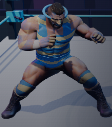
- Choose to play as either the Masked Showman Blue Bolt or the Ringside Enforcer The Bruiser.
- Select your preferred CPU difficulty from the dropdown menu, choosing between easy, normal, or hard.
- Enter the ring to view the main heads-up display, which shows health, stamina, and hype meters.
- Open the pause menu to adjust the graphics detail, clarity settings, and the music volume slider.
Controls
- Touch
- Not supported.
- Keyboard
- The pause menu lists WASD to move, J to strike, K to slam, and L to pin.
- Mouse
- The pause menu lists left click to strike and right click to slam.
More about this game
Main Event — Arcade Wrestling presents a character selection screen where you can choose to play as either Blue Bolt or The Bruiser. Before starting a match, you can set the CPU difficulty to easy, normal, or hard. The game interface includes displays for health, stamina, and hype meters for both the player and the opponent, with health starting at 100. A pause menu is available to adjust graphics detail, clarity, and music volume, as well as to review the listed control scheme.
Tips
- Review the pause menu to see the listed controls, which include using WASD to move and the spacebar to block.
- Check the graphics row in the pause menu to lower the clarity to 65 percent if you experience performance issues.
- Use the volume slider in the sound row of the pause menu to adjust the music volume, which defaults to 35.
FAQ
- Who can I play as?
- The selection screen allows you to choose between two wrestlers: Blue Bolt, who wears a cyan mask, and The Bruiser, who wears coral trunks.
- Can I change the difficulty?
- Yes, the character selection screen and the pause menu both feature a dropdown to set the CPU difficulty to easy, normal, or hard.
- What settings can I change?
- In the pause menu, you can adjust the graphics detail, change the clarity percentage up to 100, and use a slider to set the music volume.


